Video: https://youtu.be/NsFglRAF_2I
Fetchmail IMAP Filter is a free, open source add-on for Odoo 18, 19 and 20. With it, each incoming IMAP mail server fetches the unread mails that match a folder and IMAP search criteria set on that server.
The problem
Odoo's incoming mail server (fetchmail) opens INBOX on every run and asks the mail server for (UNSEEN), every unread mail (addons/mail/models/fetchmail.py, check_unread_messages). With Create a New Record: Lead selected, new conversations that are not routed elsewhere can create CRM leads.
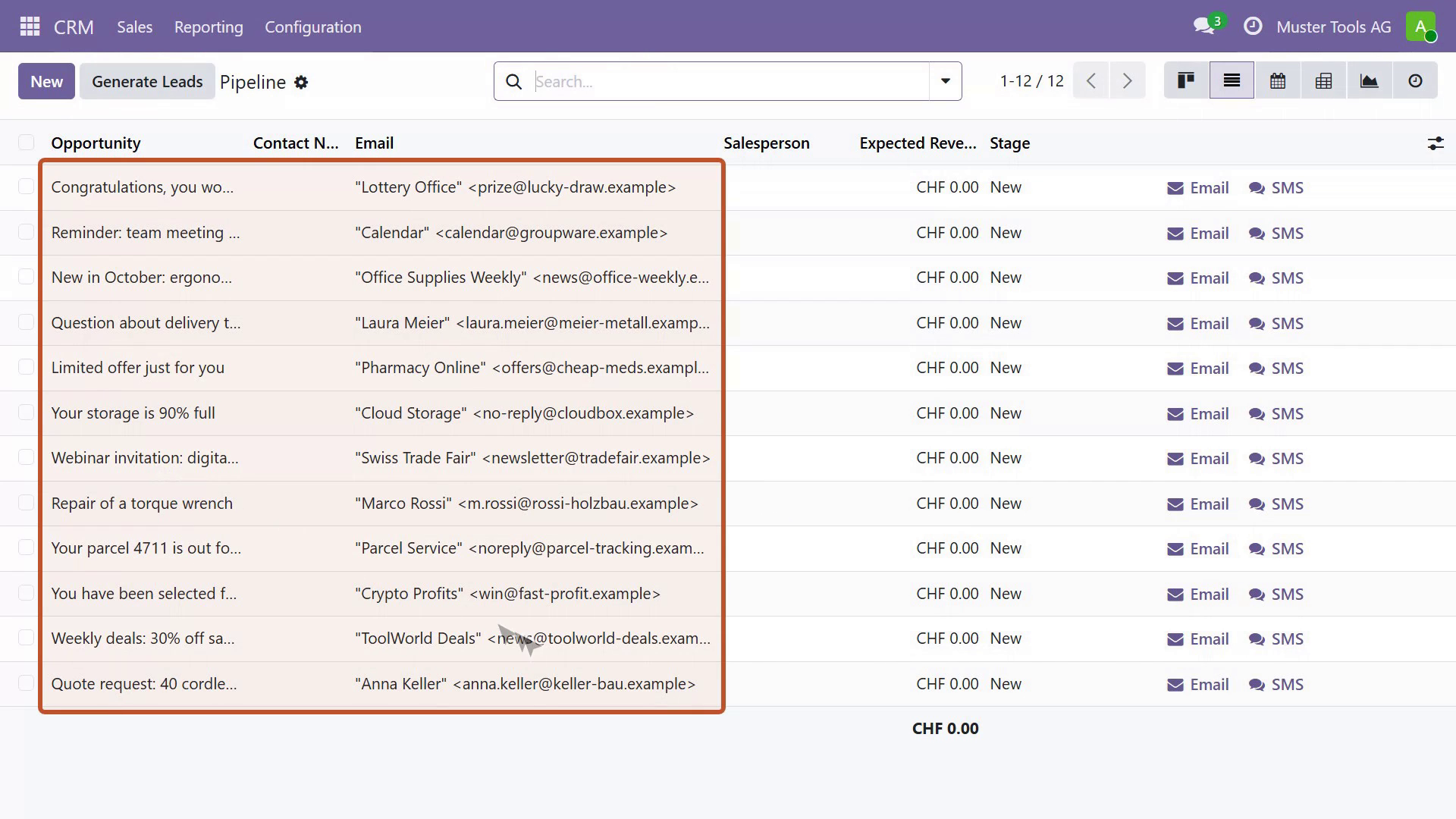
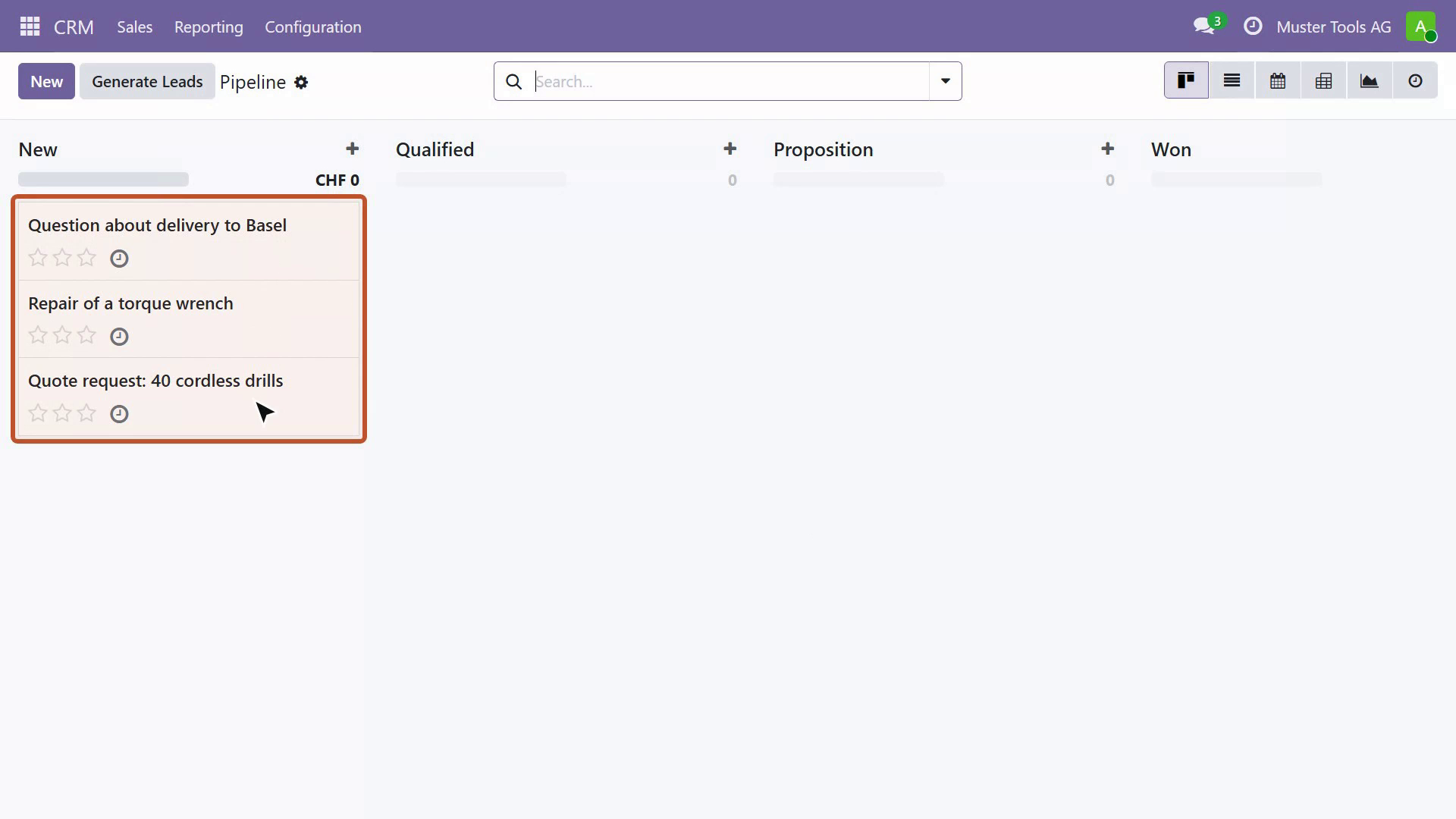
We measured it on an Odoo 19 Community test database with a local test IMAP server and twelve fictional unread mails: three customer inquiries sent to the sales alias, three newsletters, three spam mails and three notifications.
| Without the add-on | With (UNSEEN TO "sales@muster-tools.example") |
|
|---|---|---|
| IMAP search Odoo sends | SEARCH (UNSEEN) |
SEARCH (UNSEEN TO "sales@muster-tools.example") |
| Leads after one fetch | 12, including "Congratulations, you won CHF 1,000,000" | 3, only the inquiries |
| Unread mails left in the mailbox | 0 of 12 | 9 of 12 |
| Leads after a second fetch | still 12 | still 3 |
The unread row is easy to miss: core fetchmail marks every mail it fetches as read, so the people who also read that inbox in their mail client lose their unread markers.
What the add-on does
It adds two fields to each IMAP server under Settings / Technical / Email / Incoming Mail Servers (developer mode):
- IMAP Folder, default
INBOX. - IMAP Search Criteria, default
(UNSEEN).
The defaults reproduce what Odoo did before, so nothing changes until you edit them. On each fetch the add-on runs SELECT <folder> and SEARCH <criteria> instead of the hard-coded pair. In our demo the shared inbox info@ also receives the alias sales@, so (UNSEEN TO "sales@muster-tools.example") keeps only mails whose To header contains the sales address.
The search runs on the mail server and can use keys such as To, From, Subject or a header.
Validation rules
The criteria must start with UNSEEN. Saving (ALL), (NOT UNSEEN) or (OR UNSEEN SEEN) fails with a validation error, because a broader search can download already read mail again on every run.
Saving the server also rejects:
- criteria with non-ASCII characters, because the IMAP connection cannot send them in a search;
- criteria that end with an IMAP literal such as
{5}, because the mail server would wait for data that is never sent; - a line break in the folder or the criteria, so the value cannot carry a second IMAP command.
A folder name with non-ASCII characters is encoded to IMAP modified UTF-7 automatically, and a name with a space is quoted. If the mail server refuses the SELECT, the error names the folder, for example IMAP SELECT of folder 'Odoo' returned NO.
Facts
- Odoo 18, 19 and 20 (branches 18.0, 19.0 and 20.0), depends only on
mail, license LGPL-3, author DevArc GmbH. - POP servers are not touched; Gmail servers go through the same wrapper when
google_gmailis installed. - Code: https://github.com/devarc-gmbh/devarc-odoo-addons/tree/19.0/fetchmail_imap_filter
- Branches 18.0 and 20.0 for the other versions.
Sources
- Odoo 19 core:
addons/mail/models/fetchmail.py. - Add-on:
fetchmail_imap_filter/models/fetchmail_server.py, README anddocs/admin-guide.md. - Measurement: local test database and test IMAP server, fictional mails only.